Regent · Deadline tracking
Day 45 and day 180,on every file, every day.

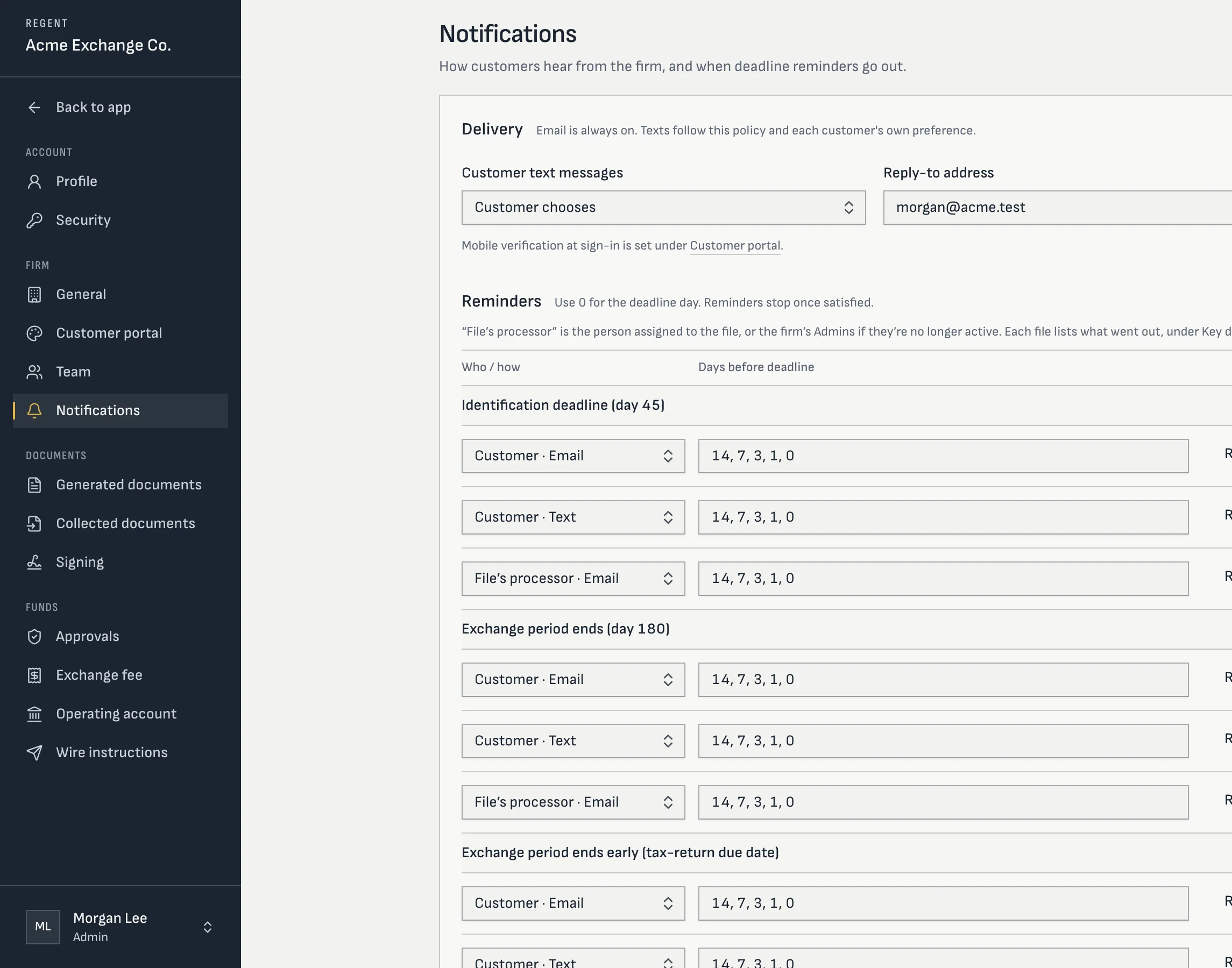
Screens from Regent today, with a sample firm and sample exchanges. Your workspace and portal carry your firm’s name and logo.
The rule
Two periods, one start date.
Both periods start the day the relinquished property transfers. The exchanger has 45 calendar days to identify replacement property in writing, and must receive it by the end of the exchange period: 180 calendar days, or the due date of their tax return for the year of the transfer, including extensions, if that comes first.
That last clause is the one spreadsheets miss. A sale in late October or later can lose weeks of its exchange period to a March 15 or April 15 due date unless the exchanger files an extension. Regent works it out for every file.
How Regent computes it
The safe date first, then the confirmed one.
| Who files the return | Assumed due date | What Regent does |
|---|---|---|
| Individual, or a one-owner LLC on its owner's return | April 15 | Uses April 15 of the year after the transfer. |
| Trust or estate | April 15 | Uses April 15. |
| C corporation | April 15 | Uses April 15 once staff record the classification. |
| Partnership, multi-member LLC or S corporation | March 15 | Uses March 15. |
| A company whose tax treatment isn't recorded | March 15 | Assumes the earlier date until staff confirm. A customer's answer can never make the deadline later on its own. |
- The exchanger can report “I’ve filed an extension” from the portal; staff settle it and the exchanger is told the result
- With an extension on file, the full 180 days apply
- Staff can record the actual due date, or override a deadline with a required note
- “Today” is your firm’s time zone, so day 45 ends at midnight where your firm is
- A notice delivered after day 45 is refused, in the same words everywhere it appears
- Disaster postponements are recorded as an override with the reason
Reminders
Reminders on your schedule, to the right people.
Each firm sets its own reminder schedule for day 45, day 180 and an exchange period that ends early at the return due date. The default is 14, 7, 3, 1 and 0 days before. Reminders go to the exchanger by email or text, and to the file’s processor by email. If day 45 passes without a notice that counts, your firm’s admins hear about it once, by name and file.
Every message lands in the file’s message log with its delivery status, so “did they get the reminder?” has an answer. Reminders stop once the step is done.
Across the firm
Every deadline in the next 14 days, on one list.
The workbench lists every file with a deadline in the next 14 days and anything already missed. The exchanges list sorts by next deadline and filters by phase, processor and “due within”. A missed day 45 or an exchange period that ended without a purchase marks the file as looking failed, for a staff member to confirm or dismiss.
Need the numbers for a single sale? The free 1031 deadline calculator runs the same rules.
Straight answers
Questions processors ask
- Does day 45 move if it falls on a Saturday?
- No. Both periods count calendar days and neither moves for a weekend or a holiday. Regent shows the real date.
- What if a federally declared disaster postpones the deadlines?
- Staff record the postponed date as an override with a note citing the relief. The original date stays in the history.
- Can Regent sync deadlines to Outlook or Google Calendar?
- Not today. Deadlines live on the file, the workbench and the exchanges list, and reminders go out by email and text.
- Do reminders go to the exchanger's CPA or attorney?
- Reminders go to the exchanger and to your staff. Outside advisors aren't users in Regent today.
Keep going
- Free tool1031 deadline calculatorDay 45 and the end of the exchange period, including the tax-return due date.Read it
- FeatureIdentification rule checksThree-property and 200% checks as the exchanger types, signed notices and staff review.Read it
- FeatureExchange managementPhases that advance on their own, follow-ups, a workbench and search across every file.Read it
- FeatureExchanger portalA phone-first portal in your firm's name: intake, identity, signing, identification and funds held.Read it
- ReferenceRegent FAQStraight answers on exchange types, money movement, documents, setup and data.Read it
- OverviewRegent1031 exchange software for qualified intermediaries, from intake to the final accounting.Read it