Regent · Exchange funds

Every dollar has a source,an approver and a timestamp.

Regent is the record of the money your firm holds for exchangers: what arrived, from whom, what is approved, what went out and what is still held, per exchange and across the firm. Nothing leaves without the controls your firm chose.
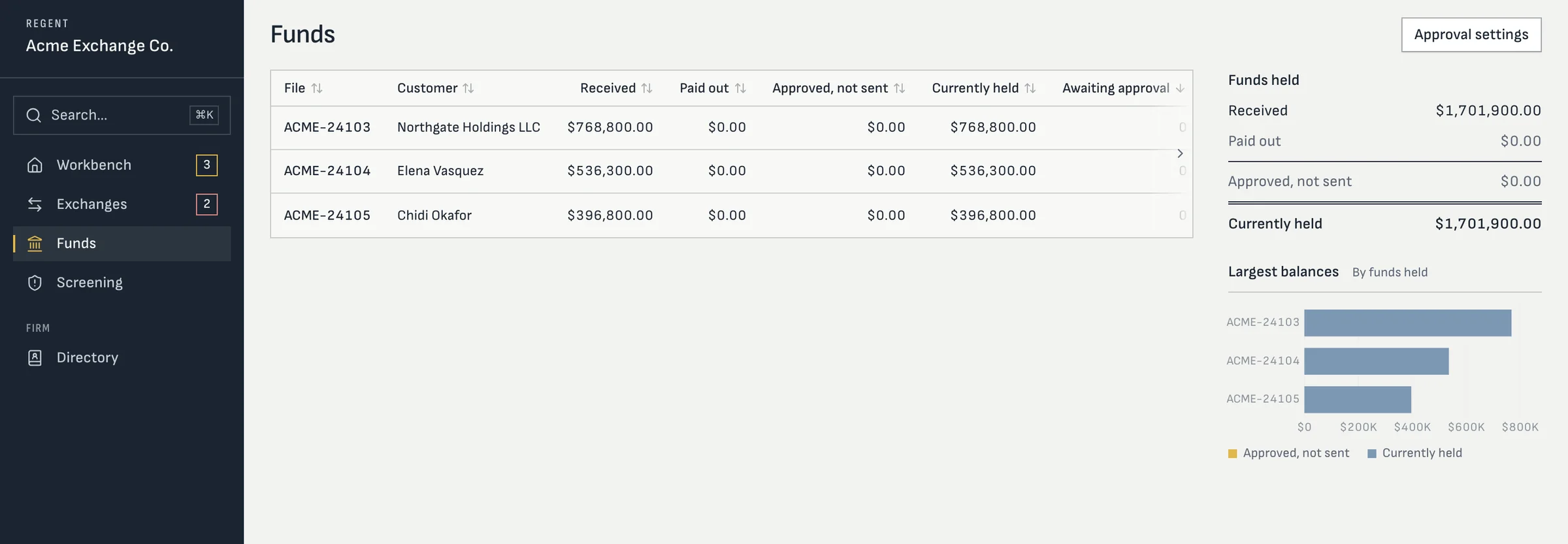
Regent Funds page: received, paid out, approved not sent and currently held for each exchange, with firm totals and a largest-balances chart
The firm's funds: received, paid out, approved but not sent, and currently held, for each file and in total.

Screens from Regent today, with a sample firm and sample exchanges. Your workspace and portal carry your firm’s name and logo.

The ledger

Balances built from the entries, never typed in.

Staff record each receipt with the escrow company, the reference and the amount, and can void one with a reason. Disbursements carry a purpose: replacement closing, earnest money, your exchange fee, a return to the exchanger, or other. The balance on every file comes from those entries, so “currently held” always agrees with the history.

  • Per-file totals: received, paid out, approved but not sent, currently held
  • Firm-wide totals and the largest balances at a glance
  • Account structure on each receipt: segregated subaccount, qualified escrow or qualified trust
  • Your exchange fee paid as a payout after the sale closes, never netted silently
  • Money kept in whole cents end to end

A payout, step by step

Five gates between a request and a wire.

  1. 01

    Prepared

    A processor prepares the disbursement against the file's balance and a purpose.
  2. 02

    Instructions verified

    The receiving instructions are confirmed by callback to a number from your escrow directory.
  3. 03

    Exchanger approves

    By one-time code in the portal, by e-signature, or on paper checked by a second staff member.
  4. 04

    Staff approve

    Two to five approvals, as your firm sets. By default neither the preparer nor the caller may approve.
  5. 05

    Sent and confirmed

    Your staff send the wire through your bank, record it as sent, then record the receipt confirmation.

A payout can also be recalled, marked failed or withdrawn, and each of those is recorded with who did it.

Your approval policy

Set once, applied to every unsent payout.

An admin sets how many approvals a disbursement needs, from two to five, and an optional amount below which one approval is enough. Verification holds for the number of days you choose; an expired verification blocks approval. Above a large-amount threshold, a second person makes their own callback. Instructions that arrive outside your business hours are flagged.

Tightening the policy takes effect at once. Loosening it waits for a second person to agree, so no one can quietly lower the bar before a payout of their own.
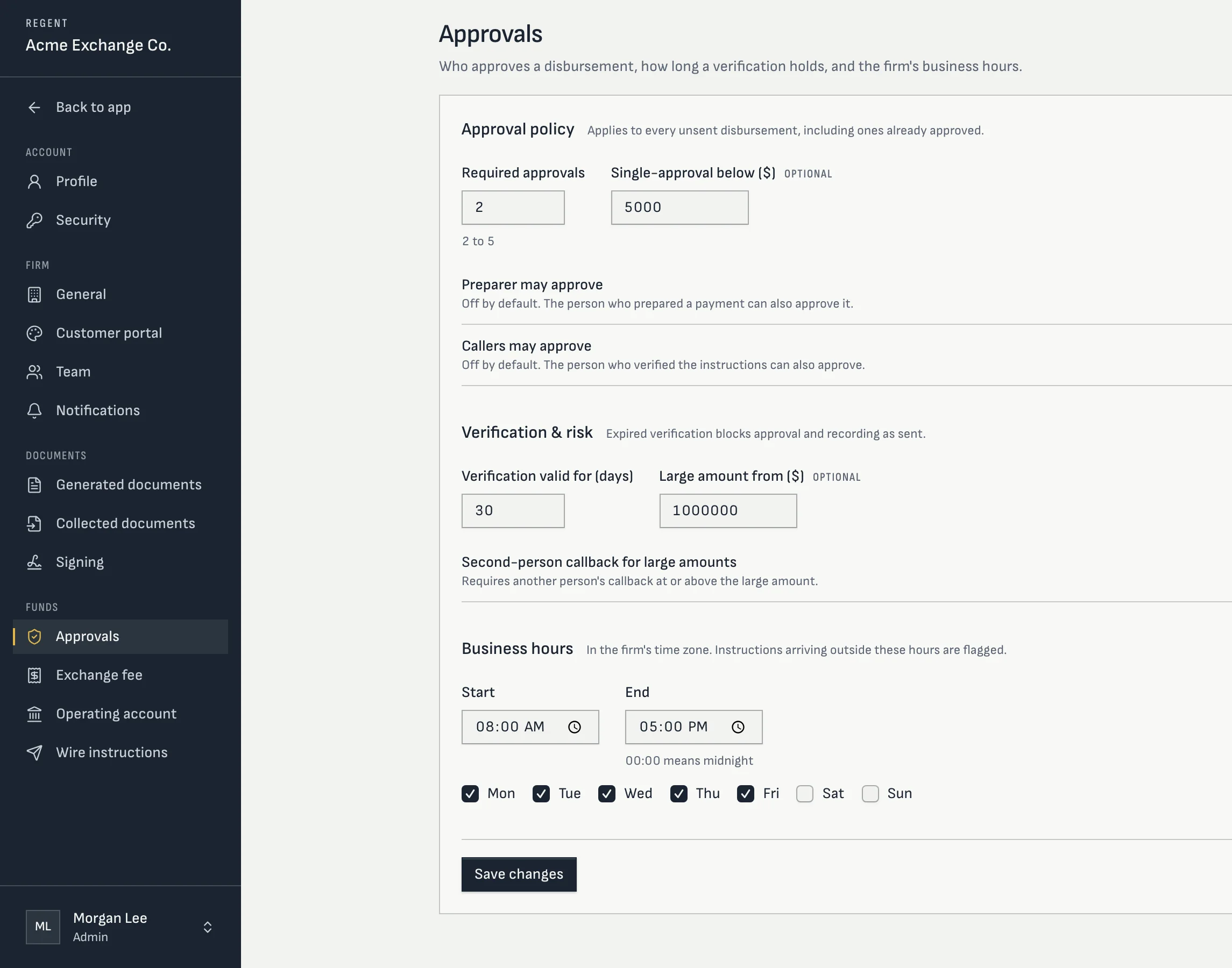
Regent approval settings: two required approvals, single approval below $5,000, verification valid for 30 days, large amount from $1,000,000 and business hours
Approval settings, as an admin sees them.

Hard stops

Sixteen hard stops, and who can clear them.

A hard stop holds the payout. Most can be cleared only by an Admin who records why; the other Admins are alerted, and someone else still has to approve. The four callback stops can't be cleared by anyone's note: the only way past them is to make the right call.

GroupStops a payout when
The payeeThe beneficiary doesn't match the payee; the bank is outside the US; the payment would go to your own firm; a fee exceeds the fee your firm set.
The instructionsThey changed within 24 hours of the planned wire; their verification expired; the callback number came from the requester, belongs to someone else, or was vouched for by the caller (these can't be overridden).
The moneyThe file doesn't hold enough; the release date hasn't arrived or isn't set; the payment falls in a restricted period.
The peopleAn open sanctions alert on the exchanger or a signer; a callback source that needs a second person's own call (can't be overridden).
Eight more conditions raise a flag for a person to weigh, such as a free-mail sender, failed email authentication, a new account for a company already on file, or a large amount.

Release rules

The exchanger can't reach the money early.

The regulation limits when an exchanger may receive, pledge or borrow exchange funds. When a file is cancelled or fails, Regent works out the earliest release date from its circumstances, such as the day after day 45 with nothing identified, or the day after the exchange period ends, and a typed release date can’t undercut it.

What Regent doesn't do

Regent records the money. Your bank moves it.

No wires from Regent

Your staff send each wire through your bank. Regent decides whether it may go and records that it did.

No bank feed

Receipts are recorded by staff from the escrow wire, with the reference and the account structure.

No interest calculation

Interest is a payout purpose and a disclosure. Regent doesn't accrue or compute it today.

Straight answers

Questions processors ask

Can one person prepare and approve a payout?
Not by default. The preparer and the person who made the callback can't approve unless an admin allows it, and that change itself needs a second person.
How does the exchanger approve a payout?
From the portal with a one-time code, by e-signature, or on a signed paper form that a second staff member checks.
Does Regent hold the money?
No. Your firm holds exchange funds in its own accounts at its bank. Regent is the ledger and the control system around them.
What happens if a wire goes to a fraudster anyway?
Regent includes a step-by-step incident checklist: recall, the receiving bank’s fraud desk, a report to IC3 and the FBI, and your insurer. See wire fraud controls.

Show your auditor where every dollar went.

We'll walk a payout from preparation to confirmation, with the approvals and the record it leaves.

Your team has a direct line to ours.